Minimart POS system
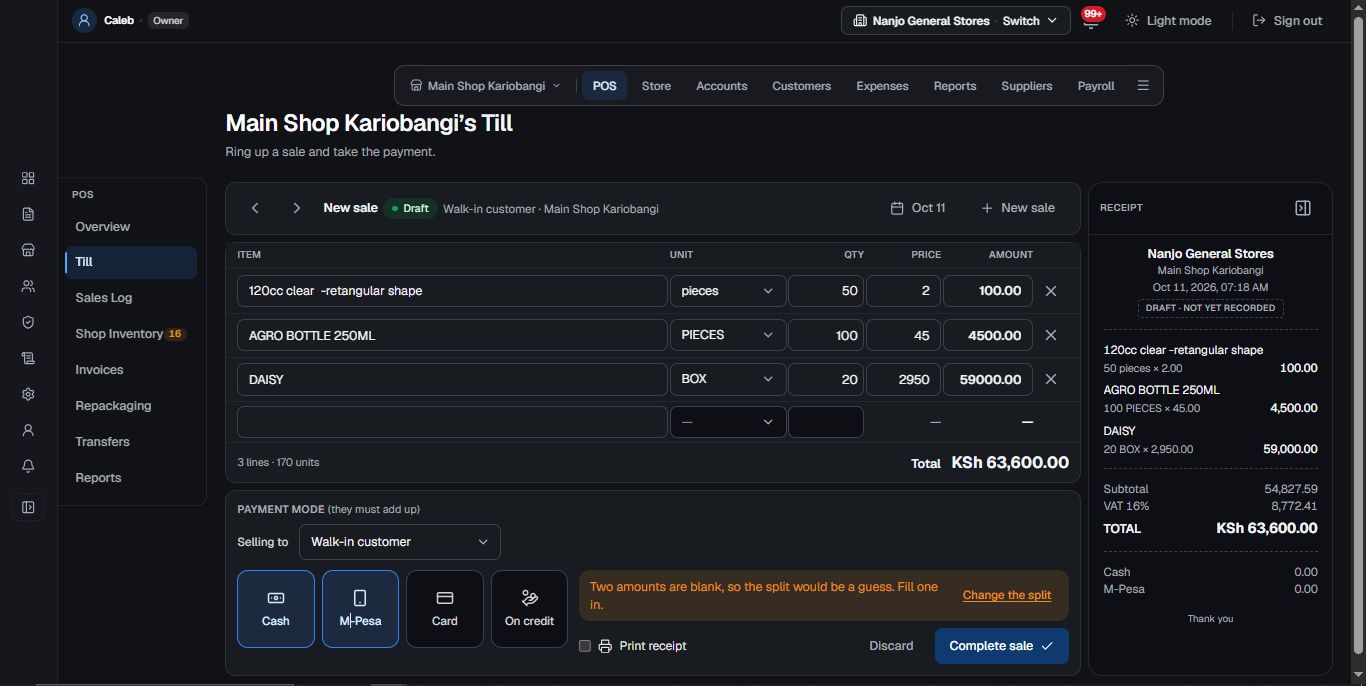
A minimart needs a till that anyone at the counter can use, and an owner who can see the shop without standing in it. Thenaji gives you both: a plain till for the counter and the day’s figures on your phone.
What it handles for you
- A till simple enough for a new cashier on the first day
- Stock goes down with every sale, so you see what is running low
- Buy from a supplier and the stock and the bill are recorded together
- Each member of staff signs in as themselves, and sees only what their job needs
- The day’s sales and cash in the drawer, from your phone
On the same platform
- The till and M-Pesa
- Cash, M-Pesa and credit, with a receipt for every sale.
- Every branch, one system
- Shops and stores apart, and all of them together.
- The books, kept as you trade
- Profit and loss, balance sheet and VAT, written by every sale.
- On your phone
- The same figures as the counter, wherever you are.
Questions owners ask
Is it too much system for one small shop?
No. A one-shop business uses the till, the stock and the takings, and the rest stays out of the way until the day you open a second branch.
Can I check the shop when I am not there?
Yes. Thenaji runs online, so the same figures the counter sees are on your phone the moment a sale is made.
Other businesses on Thenaji
Every business we cover- WholesaleBales, cartons and credit customers, with every invoice traced.Wholesale POS and distribution system
- Cereals and food shopsBuy by the sack, sell by the kilo, know the open sack.Cereal and food shop POS system
- Repackaging businessesBulk in, packets out, the cost of every packet known.Repackaging business software
- Bars and restaurantsBottles, tots and drinks stock that adds up at closing.Bar and restaurant POS system
See it set up for your business
We start with a meeting about how your business runs, then build a demo around it for you to try before anything goes live.
Book a walkthrough